Skip to content

🛠️ Cluster Management

Important

All resources should be modified using only Terraform and not using the dashboard. Modifying resources via the dashboard puts the state at risk of becoming out of sync and hard to manage across multiple members.

Once the cluster is running, it's worth understanding the general setup in case we need to scale up, modify the underlying hardware or verify the health of the cluster.

Cluster version upgrades

To upgrade the cluster version, open up production.tfvars and staging.tfvars. There will be a value called k8s_cluster_version. You can find relevant releases and patch versions here.

You can view and apply the plan with: terraform [plan/apply] -var-file=staging.tfvars

Node locations

For HA (high availability), the master nodes (control plane) are managed by Google and the worker nodes (data plane) are controlled by us using node pools.
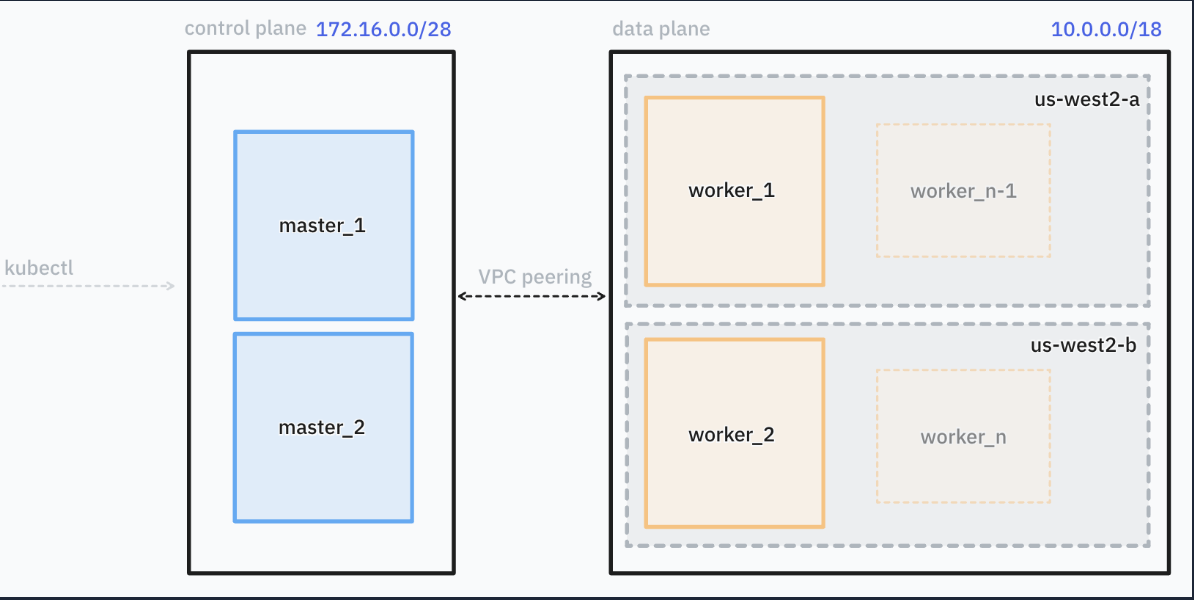
arch

In the above we have:

  • Control plane managed by Google in a separate VPC that is peered with our cluster VPC
  • Data plane managed by us with 1 node per zone across 2 zones

Let's understand how this maps in Terraform

terraform/main.tf
...

module "kubernetes" {
  source = "./kubernetes"
  region = var.region

  service_account          = var.service_account
  project                  = var.project
  node_locations           = var.node_locations
  master_node_machine_type = var.master_node_machine_type
  worker_node_machine_type = var.worker_node_machine_type
  worker_node_count        = var.worker_node_count

  cluster_network     = module.networking.cluster_network_name
  private_subnet_name = module.networking.private_subnet_name

  data_plane_disk_gb    = 50
}

The highlighted section above determines what machine type to use:

  • Staging: e2-medium
  • Production: c2-standard-4

The worker_node_count corresponds to how many workers per zone are configured. The zone locations are defined by the node_locations.

If you have 3 zones for node_locations and worker_node_count is set to 3 then you would have a total of 9 worker nodes.

To scale up the cluster or adjust hardware, etc. You just simply need to modify the variables used in [staging,production].tfvars and reapply the plan via make apply.

Healthchecks

You can verify the health of the OTFE services by hitting the healthcheck directly.

curl --request GET \
--url https://otfe-k8s.staging.videodelivery.net/healthcheck \
--header 'Authorization: Basic base64Encode(user:pass)' 
curl --request GET \
--url https://otfe-k8s.videodelivery.net/healthcheck \
--header 'Authorization: Basic base64Encode(user:pass)' 

Certificate Renewal

For certificate renewal, we rely on Jetstack to auto rotate certs based on the expiry of the certificate. However, if you want verify the cert details, we can do so via Kubernetes with the following commands.

Retrieve certificate resource information

kubectl get cert-manager

View certificate expiration

kubectl describe certificate/otfe-k8s-staging-videodelivery-net

Name:         otfe-k8s-staging-videodelivery-net
Namespace:    otfe-staging
Labels:       <none>
Annotations:  <none>
API Version:  cert-manager.io/v1
Kind:         Certificate
Metadata:
  Creation Timestamp:  2024-02-13T16:48:22Z
  Generation:          2
  Resource Version:    6000
  UID:                 7106e746-903e-470c-93ab-8c5bce37548a
Spec:
  Common Name:  otfe-k8s.staging.videodelivery.net
  Dns Names:
    otfe-k8s.staging.videodelivery.net
  Issuer Ref:
    Kind:        Issuer
    Name:        letsencrypt-cloudflare
  Renew Before:  1h0m0s
  Secret Name:   otfe-k8s-staging-videodelivery-net
Status:
  Conditions:
    Last Transition Time:  2024-02-13T16:49:37Z
    Message:               Certificate is up to date and has not expired
    Observed Generation:   2
    Reason:                Ready
    Status:                True
    Type:                  Ready
  Not After:               2024-05-13T15:49:35Z
  Not Before:              2024-02-13T15:49:36Z
  Renewal Time:            2024-05-13T14:49:35Z
  Revision:                1
Events:
  Type    Reason     Age   From                                       Message
  ----    ------     ----  ----                                       -------
  Normal  Issuing    54m   cert-manager-certificates-trigger          Issuing certificate as Secret does not exist
  Normal  Generated  54m   cert-manager-certificates-key-manager      Stored new private key in temporary Secret resource "otfe-k8s-staging-videodelivery-net-v2gpd"
  Normal  Requested  54m   cert-manager-certificates-request-manager  Created new CertificateRequest resource "otfe-k8s-staging-videodelivery-net-1"
  Normal  Issuing    53m   cert-manager-certificates-issuing          The certificate has been successfully issued

Force auto-renew certificate

Important

You shouldn't need to run this manually ever as we rely on Jetstack to handle auto-rotation, but I will add for reference in case there is an issue with cert rotation.

kubectl patch certificate otfe-k8s-staging-videodelivery-net -n otfe-staging --type='json' -p='[{"op": "replace", "path": "/spec/renewBefore", "value": "1h"}]'